note
Kotlin Coroutines
Explanation
Kotlin Coroutines are a language feature in Kotlin , with additional functionality provided by the kotlinx.coroutines library. It allows us to work with Asynchronous Programming, allowing the execution of non-blocking code.
The concept of a Coroutine is a “Function that can be paused”
Analogy
A chef managing multiple dishes in a busy kitchen never stands and watches water boil. When a dish needs the oven, she puts it in, sets a mental note of what step she’s on, and starts something else. The dish doesn’t forget its state — the recipe continues exactly where it left off when she comes back. And the kitchen never stops moving while anything is waiting.
The suspend keyword is that mental note. The coroutine is the chef. The thread is the kitchen itself — one kitchen can serve hundreds of in-progress dishes at once, because most of them are just waiting, not actually needing a chef right now.
Suspension
A regular function has two modes: return immediately (losing all local state), or block the thread until it has something to return. A suspend function adds a third: it can suspend — emitting a special signal to the Kotlin runtime that says “I’m not done, but I’m not blocking either. Save a snapshot of my current position and local variables, free the thread, and resume me when the thing I’m waiting for is ready.”
That snapshot is called a Continuation. Under the hood, the Kotlin compiler transforms every suspend function into a state machine — each suspension point becomes a numbered state, and the Continuation object remembers which state to jump back to along with all local variables. This is why coroutines are cheap: suspending doesn’t touch the OS thread scheduler, it’s just an object being parked and re-queued.
Under the hood it the return type changes to Any? because it returns either the result OR COROUTINE\_SUSPENDED.
Suspending Functions
Suspending functions are how kotlin implements the Suspension mechanism and Structured concurrency, and for this mechanism to work, there’s a golden rule:
Suspending functions can only be called from other suspending functions
Of course there has to be a way (or multiple) for regular code to start a “coroutine tree” and kickstart the work, which we’ll see later.
Structured Concurrency
Kotlin Coroutines leverage Structured Concurrency, where concurrent tasks are grouped under a scope with a well-defined lifetime, ensuring all tasks complete or cancel before the scope exits.
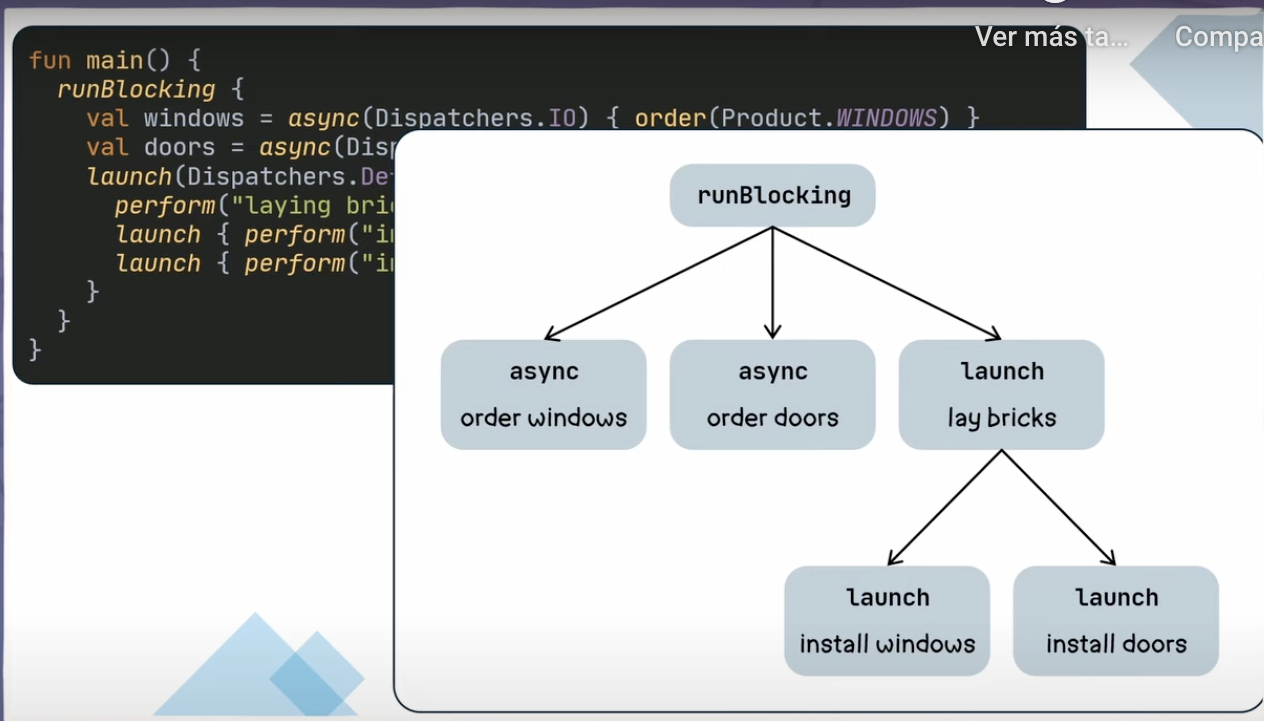
Concurrency vs. Parallelism in Coroutines
It’s crucial to understand the distinction between concurrency and parallelism in the context of coroutines:
- Concurrency is about dealing with multiple tasks at once, which coroutines excel at by default.
- Parallelism is about executing multiple tasks simultaneously, which requires multi-core processors and appropriate dispatchers.
Building Blocks
Layer 1: The Coroutine Container
Coroutine Scope
A CoroutineScope is the owner of all its children coroutines. Every coroutine you launch must live inside a coroutine scope, and when the scope is cancelled, all its children are cancelled too.
This CoroutineScope is usually tied to a lifecycle-aware object, like an Activity or ViewModel, that cancels its work when the object’s lifecycle changes.
class MyClass():LifecycleAwareComponent  {
    /** A CoroutineScope is created with a Dispatcher and a Job:
	- Use `SupervisorJob` when you want child failures to not affect siblings (good for side-effects)
	- Use `Job` when you want to cancel the root CoroutineScope when a child fails
	**/
 // val scope = CoroutineScope(Dispatchers.Main + Job())
    val scope = CoroutineScope(Dispatchers.Main + SupervisorJob())

	override fun onStop() {
		scope.cancel()
	}
}
Jobs
A Job is a cancellable unit of work that represent’s a coroutine’s lifecycle. It is a reference to a coroutine’s lifecycle and it allows to:
- Check it’s state/lifecycle: We can know the state of the current work with
isActive,isCompletedandisCancelled - Cancel all children: With
job.cancel()we can cancel all its children recursively - Join: We can await for a job’s completion with
job.join()(suspending call)
Every coroutine has a Job automatically. launch/ async return it so you can control lifecycle, and a Job moves trough different lifecycle states: Active → Cancelling → Cancelled → Completed.
Layer 2: Launching Work (Coroutine Builders)
scope.launch { }— fire and forget. Returns aJob(a cancellation handle, not a value). Use for work where you don’t need a return value, like side effects. - Can be awaited withjob.join()- just await for finishing, not actual value.- Best for UI updates, analytics and logging.
scope.async { }— returns aDeferred<T>, which carries a future value. You call.await()later to get it.- Best for parallel computations and aggregating results.
Both inherit the scope’s dispatcher unless you override it.
Layer 3: Dispatchers
Dispatchers define which thread pool a coroutine runs on:
Dispatchers.Main— UI thread (Android)Dispatchers.IO— blocking I/O (network, disk, DB)Dispatchers.Default— CPU-intensive work (sorting, parsing)
**withContext** switches dispatcher for a block, then switches back:
// called from Main thread
suspend fun loadUser(id: String): User {
    return withContext(Dispatchers.IO) {
        database.getUser(id)  // runs on IO
    }
    // automatically back on Main after the block
}
Layer 4: Parallelism
Async + Await
async { } + await() — launch multiple operations in parallel and collect results:
val a = async { fetchUser() }
val b = async { fetchPosts() }
// both running now
val user = a.await()
val posts = b.await()
Scope Builders
Coroutine Scope
Use when: Children are steps in one coordinated operation
**coroutineScope { }** — creates a child scope that suspends the parent until all launched children complete. If any child fails, all siblings are cancelled and the exception bubbles up. This is the right structure for fan-out work:
coroutineScope {
    val a = async { work1() }
    val b = async { work2() }
    a.await() + b.await()
}
// only reaches here when both finished (or one failed)
Supervisor Scope
Use when: Children are independent tasks (e.g. loading multiple items in a list)
**supervisorScope { }** is the structured equivalent of coroutineScope { } — same idea (suspends parent until all children finish) but with supervisor failure semantics:
supervisorScope {
    launch { riskyWork1() }  // if this fails...
    launch { riskyWork2() }  // ...this keeps running
}
Layer 5: Cancellation
Coroutine cancellation relies on a special kind of Exception called CancellationException.
When you cancel a job (job.cancel() ) you aren’t throwing the cancellation immediately, you just change the Job’s state to “Cancelling” and the exception is thrown by a cancellable suspending function. Most of the built-in suspending functions (delay yield withContext ) first check for that flag and then continue doing the work, they are called Checkpoints.
In Kotlin, cancellation is cooperative and happens on such suspension checkpoints. While most libraries already handle this “checkpoints”, but when implementing custom computeHeavy calculations that can be cancelled, make sure to check for ensureActive(), this way CancellationException will get thrown.
CancellationException is not a failure — it’s the cancellation mechanism
Layer 6: Exception Handling
Since Coroutines use Exceptions as its method for propagation, there’s a risk of swallowing the CancellationException, effectively leaving zombie coroutine.
So, to work along with this mechanism and not against it, here are some rules to follow:
- Do not catch
Exceptionwithout re-throwingCancellationExceptioninside asuspendfunction - If a coroutine needs clean-up, do so in the
finallyblock of atryinside the coroutine, this ensures that the code runs even whenCancellationExceptionis thrown - Clean-up work
withContext(NonCancellable)if you don’t want to leave things half-done even after a cancellation - Never use stdlib
runCatchingin coroutines (swallows cancellation)
Helpers to work with Coroutine Cancellation and handle regular Exception Handling
// Custom runCatching
suspend fun <T> runCatchingSafe(block: suspend () -> T): Result<T> =
    try { Result.success(block()) }
    catch (e: CancellationException) { throw e }  // ← rethrow!
    catch (e: Exception) { Result.failure(e) }

// Safe API call w/ Custom exception mapping
fun Throwable.toAppException(): AppException = when (this) {
    is CancellationException -> throw this
    is IOException -> AppException.Network(this)
    is HttpException -> AppException.Http(
        code = code(),
        body = response()?.errorBody()?.string(),
        error = this
    )
    else -> AppException.Unknown(this)
}

suspend inline fun <T> apiResult(
    crossinline block: suspend () -> T
): ApiResult<T> =
    try {
        ApiResult.Success(block())
    } catch (t: Throwable) {
        ApiResult.Failure(t.toAppException())
    }


val user = apiResult { api.getUser() }

// Top-level handler (only for UI)

val handler = CoroutineExceptionHandler { _, e ->
    if (e !is CancellationException) showError(e)
}

launch(handler) {
    try { api.fetch() }
    catch (e: HttpException) { showNetworkError(e) }
    catch (e: CancellationException) { throw e }  // ← rethrow!
}
Layer 7: Multi-shot streams
So far, coroutines allowed us to suspend a function when waiting for other thing to finish and return a single value when done, but sometimes we need streams of data. For that, we use Kotlin Flows (read more).
Interop
To Interop with other non-suspending libraries, there are a few options we can use and each one for different use cases:
- Blocking Java API
suspend fun loadUser(): User = withContext(Dispatchers.IO) {
    legacyApi.getUserBlocking()
}- Single-shot Callback API
suspend fun loadUser(): User = suspendCancellableCoroutine { cont ->
    legacyApi.getUser(
        onSuccess = { cont.resume(it) },
        onError = { cont.resumeWithException(it) }
    )
}- Single-Shot Observer with Cleanup i.e API calls with RXJava
suspend fun fetchUserFromRxJava(): User = suspendCancellableCoroutine { cont ->
    val disposable = api.getUserSingle()
        .subscribe(
            { user -> cont.resume(user) },              // onNext
            { error -> cont.resumeWithException(error) } // onError
        )

    cont.invokeOnCancellation {
        disposable.dispose()  // cleanup on cancel
    }
}- Multi-shot Callback streams (using Kotlin Flows )
fun observeLayoutChanges(): Flow<LayoutChanged> = callbackFlow {
    val listener = OnLayoutChangedListener { emit(LayoutChanged(it)) }
    view.addOnLayoutChangeListener(listener)
    awaitClose { view.removeOnLayoutChangeListener(listener) }  // cleanup
}- Custom suspending functions (Cooperative cancellation)
// ❌ Unstoppable: no check, runs forever after cancel
viewModelScope.launch(Dispatchers.Default) {
    for (i in 1..10_000_000) {
        heavyComputation(i)
    }
}

// ✅ Cooperative: cancels immediately
viewModelScope.launch(Dispatchers.Default) {
    for (i in 1..10_000_000) {
        ensureActive()  // ← throws CancellationException if cancelled
        heavyComputation(i)
    }
}
Visualisation
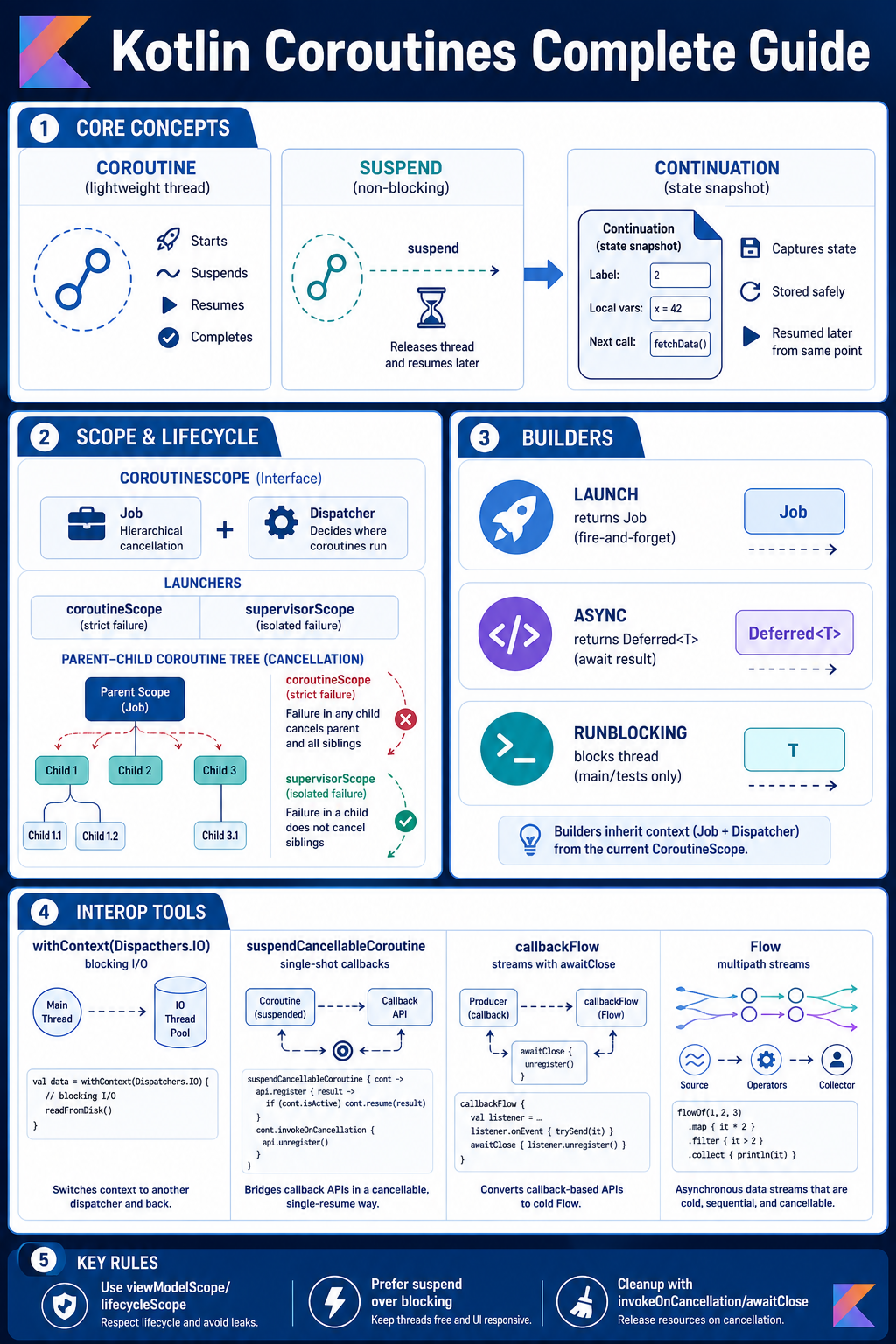
Coroutine Secrets
- Don’t catch
exceptionin try-catch - Don’t call other suspend function on a
finallyblock, if you want it to be executed - For large blocking operations that do not support cancellation, make sure to check for cancellation on each iteration.
- Don’t just switch dispatchers hard-coded, better use an abstraction for test cases.
- If you need access to a
GlobalScopeit is better to inject it to improve testability
Open Questions
CoroutineScope vs: One is a Coroutine Builder and the other is a Scope BuildercoroutineScopeHow to create custom Scopes i.e. a Presenter to be life-cycle aware:Use a CoroutineBuilder (usually aSupervisorJob) and hook it into the object’s lifecycle i.e. onPauseTransform non-supending functions to suspending calls:UsesuspendCancellableCoroutine- When is valid to use
runBlocking?- In a JVM
mainfunction: Prevents JVM from closing before coroutines are completed - Unit tests: Wait for coroutine result
- Bridge Kotlin → Java: Turn
suspend→ blocking API for legacy Java (when java is moving to the prover thread)
- In a JVM
References
Collect Like a Pro: a deep dive on the Android lifecycle-aware coroutines APIs | Manuel Vivo
Kotlin Flows