output
How to switch between different IDEs with a single shortcut in MacOS and Raycast
Intro
Similar to Josean Martinez’s Window Management Workflow, I used to use Aerospace and map a single key to a specific space where I would have a specific app or type of apps. Here’s where the issue arose: I use many different IDEs and code editors like Xcode, IntelliJ, VSCode, and Android Studio, and I didn’t want to create a single keybinding for each one of them. So, I just wanted a keybinding that would open whatever IDE I have open, and if I’m using two, cycle between them.
So, for this, I’ve decided to create an Apple Script that will check if any of the specified apps is open/focused and either bring it to focus, open a default IDE, or cycle between multiple apps. I will also use Raycast’s ability to run Apple Scripts and assign keybindings to it.
Getting the bundle ID of every IDE/App
We first to know the Bundle ID of every app in our system so that is easily identifiable by the script. The following command will give you the ID an app on MacOS.
osascript -e 'id of app "Visual Studio Code"'And here’s a list of common IDEs
- Most common ones:
- IntelliJ Idea:
com.jetbrains.intellij - Android Studio:
com.google.android.studio - VsCode:
com.microsoft.VSCode - Zed:
dev.zed.Zed - Xcode:
com.apple.dt.Xcode
- IntelliJ Idea:
Integration with Raycast
Now, we need to tell Raycast to create our Script, by searching “Create Script Command” and selecting Apple Script in the “Template” section.
Once we have created or template, you can find it in Raycast’s “Extensions” and assign a Hotkey to it.
The actual apple script
Once we have the list of apps we want to “group” with out keybinding, place them in the targetIDEBundleIDs collection, and also set defaultApp to the app you want to open in case none are opened.
#!/usr/bin/osascript

# Required parameters:
# @raycast.schemaVersion 1
# @raycast.title Open IDE
# @raycast.mode silent

# Documentation:
# @raycast.description Open the current IDE or falls back to a text editor
# @raycast.author fernando

property targetIDEBundleIDs : {"com.jetbrains.intellij", "com.google.android.studio", "dev.zed.Zed", "com.microsoft.VSCode", "com.apple.dt.Xcode"}
set defaultApp to "com.microsoft.VSCode"


set activeAppBundleID to ""
try
	tell application "System Events"
		set frontProcess to first process whose frontmost is true
		set activeAppBundleID to bundle identifier of frontProcess
	end tell
on error errMsg
	log "Error getting active application bundle identifier: " & errMsg
	display dialog "Could not determine the active application. Please ensure Script Editor has permission to control System Events." buttons {"OK"} default button 1 with icon caution
	return
end try


set runningAppBundleIDs to {}
try
	tell application "System Events"
		repeat with p in (application processes whose background only is false)
			try
				set bid to bundle identifier of p
				if bid is not missing value then
					set end of runningAppBundleIDs to bid
				end if
			end try
		end repeat
	end tell
on error errMsg
	log "Error getting list of running applications: " & errMsg
end try


set runningTargetIDEBundleIDs to {}
repeat with bid in runningAppBundleIDs
	if bid is in targetIDEBundleIDs then
		set end of runningTargetIDEBundleIDs to bid
	end if
end repeat

if (count of runningTargetIDEBundleIDs) is 0 then
	log "No target IDEs running. Opening Default."
	try
		tell application id defaultApp
			activate -- Launch and bring to front
		end tell
	on error
		log "Zed application not found or failed to open."
		display dialog "Zed application not found. Please ensure Zed is installed in your Applications folder."
	end try

else
	log "At least one target IDE is running."

	set otherRunningTargetIDEBundleIDs to {}
	-- log "running " &activeAppBundleID
	-- log "apps running " &runningTargetIDEBundleIDs
	set isRunning to false
repeat with anItem in runningTargetIDEBundleIDs
    -- Compare the string value of the active app with the contents of the reference
    if (activeAppBundleID as string) is equal to (contents of anItem as string) then
        set isRunning to true
        exit repeat -- Stop searching once a match is found
    end if
end repeat
	if isRunning then
		log "Active app (" & activeAppBundleID & ") is a running target IDE."

		repeat with bid in runningTargetIDEBundleIDs
			if (bid as string) is not equal to (activeAppBundleID as string) then
				set end of otherRunningTargetIDEBundleIDs to bid
			end if
		end repeat

		if (count of otherRunningTargetIDEBundleIDs) is not 0 then
			set appToActivateID to item 1 of otherRunningTargetIDEBundleIDs
			log "Other running target IDEs found. Activating: " &appToActivateID
			try
				tell application id (appToActivateID as text)
					activate
				end tell
			on error
				log "Failed to activate application with bundle ID: " & appToActivateID
			end try
		else
			log "Active target IDE is the only one running from the list. Doing nothing (already focused)."
		end if
	else
		set appToActivateID to item 1 of runningTargetIDEBundleIDs
		log "Active app " &count of runningTargetIDEBundleIDs  & " Other running IDEs:"
		log "Switching to the first running target IDE found: "
		try
			tell application id appToActivateID
				activate
			end tell
		on error
			log "Failed to activate application with bundle ID: "
			display dialog "Failed to activate "
		end try
	end if
end if

log "Script finished."
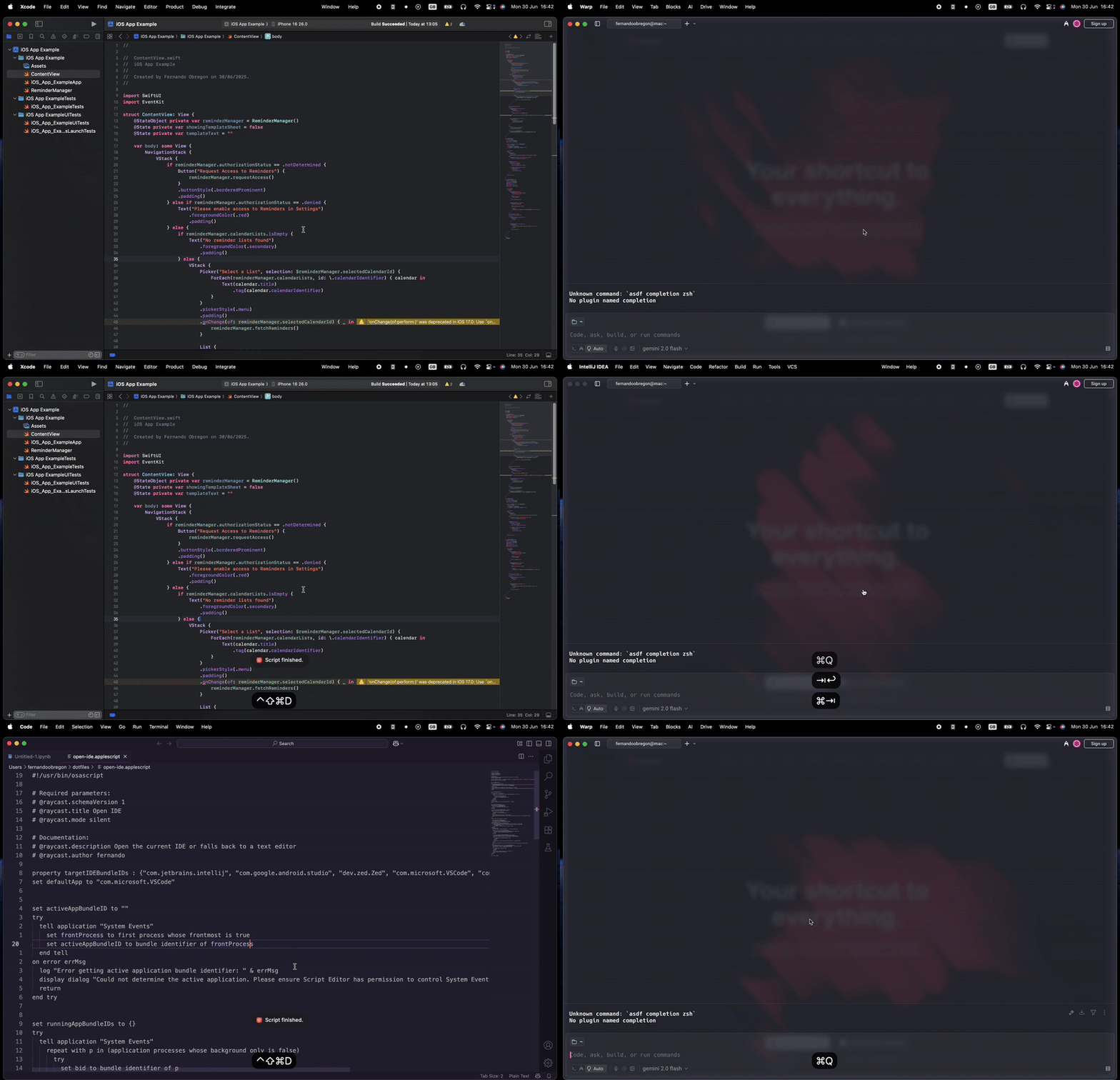
Demo!
In the following demo, I’ve set ⌃⇧⌘ + D as my shortcut for my “Development” apps.